Never* Run Out of Compute: A Practical Guide to GKE Resource Obtainability
Have you ever tried to scale up a GKE cluster during a traffic spike or launch a GPU node pool for model training, only to get a GCE_RESOURCES_EXHAUSTED or a generic resource unavailability error?
If you’ve run workloads at scale on Google Kubernetes Engine (GKE), you’ve likely felt that pain. In cloud computing, resource obtainability is all about making sure your applications can reliably get the compute (CPUs, Memory, GPUs, and TPUs) it needs, exactly when it needs it, even during regional demand surges or global chip shortages.
* This list is not exhaustive and it’s not a guarantee, but it increases your chances of getting the resources you need to run your workloads.
1. Compute Engine Capacity Guarantees: Lock It In with Reservations
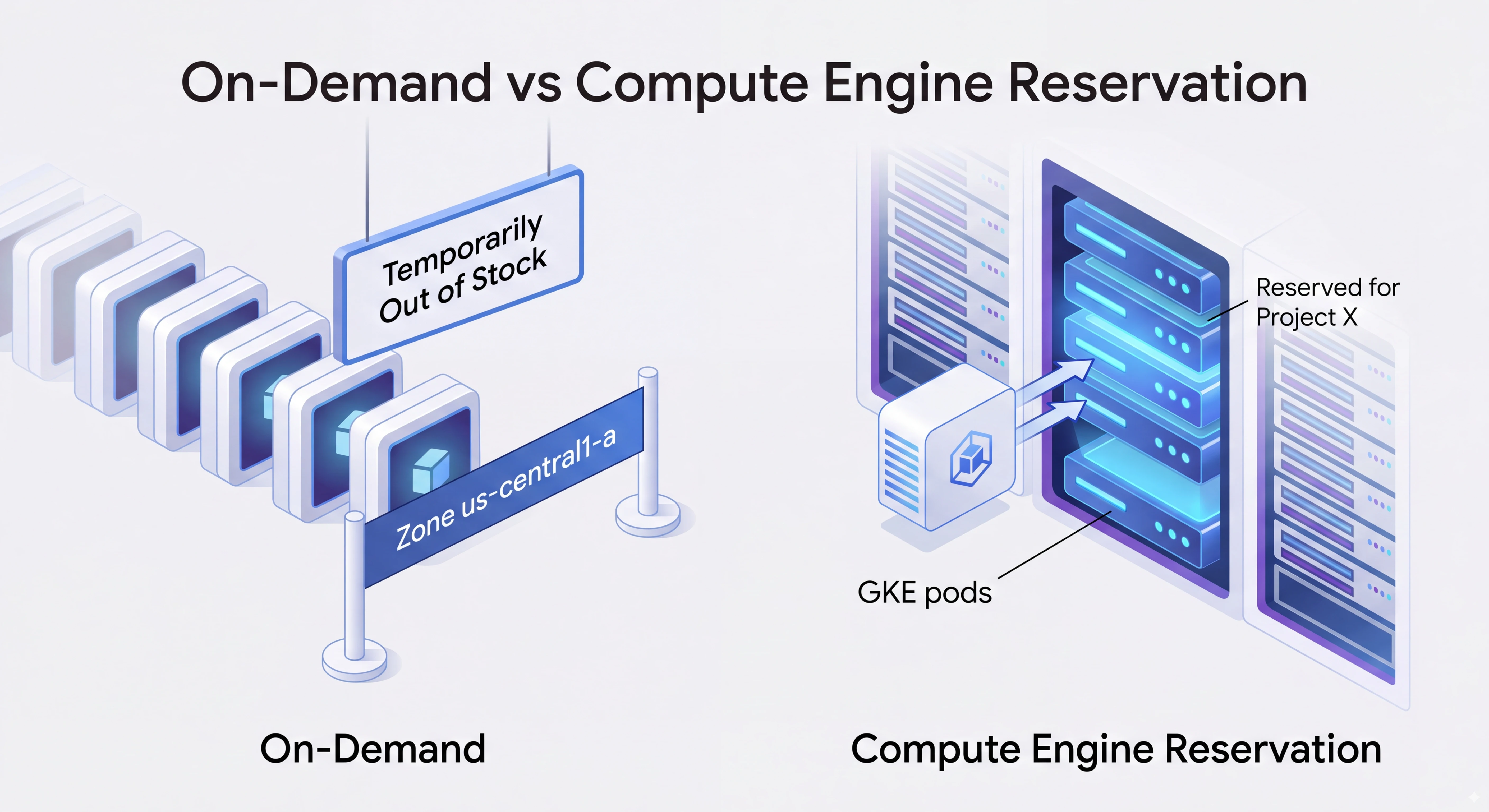
When your app simply cannot fail to start, think Black Friday, a major product launch, or a core production database, relying on standard on-demand provisioning is a gamble. If a whole region experiences a sudden spike in demand, on-demand capacity can temporarily dry up.
This is where Compute Engine Reservations come in. Think of a reservation as buying an assigned seat at a concert: the compute hardware is physically allocated to your GCP project in a specific zone, waiting for your pods to claim it.
How to Use Reservations Wisely in GKE
- Master Reservation Affinity:
- ANY_RESERVATION (Default): GKE will automatically grab any available matching reservation in the zone. Great for general pool capacity.
- SPECIFIC_RESERVATION: Forces your node pool or pod to consume a specifically named reservation. Use this when you have dedicated capacity reserved for a critical tenant or workload.
- NONE: Tells GKE to ignore reservations completely. Pro-tip: Always set NONE on Workload that should run on Spot VM node pools so cheap, background batch jobs don’t accidentally consume your expensive, hand-crafted reserved capacity!
- Plan Ahead with Future Reservations: Pre-book capacity weeks or months in advance for major calendar events.
- Pool Resources with Shared Reservations: Share reservation blocks across multiple GCP projects within your organization so unused capacity doesn’t go to waste.
Example: Pod using a reservation.
 apiVersion: v1
  kind: Pod
  metadata:
    name: specific-same-project-pod
  spec:
    nodeSelector:
      cloud.google.com/compute-class: Performance
      cloud.google.com/machine-family: n2
      cloud.google.com/reservation-name: reservation-name
      cloud.google.com/reservation-affinity: "specific"
    containers:
    - name: my-container
      image: "k8s.gcr.io/pause"
      resources:
        requests:
          cpu: 2
          memory: "4Gi"
Useful Google Cloud Docs
2. Dynamic Workload Scheduler (DWS): Getting Rare GPUs Without Long Commitments
High-end AI accelerators like NVIDIA GPUs, and Google TPUs are in massive demand worldwide. Getting standard on-demand quota for hundreds of GPUs without a multi-year commitment can feel almost impossible.
Google Cloud built the Dynamic Workload Scheduler (DWS) specifically to solve this problem. It introduces two super flexible ways to get your hands on scarce AI hardware:
A. Flex Start Mode: “Get in Line and Launch Together”
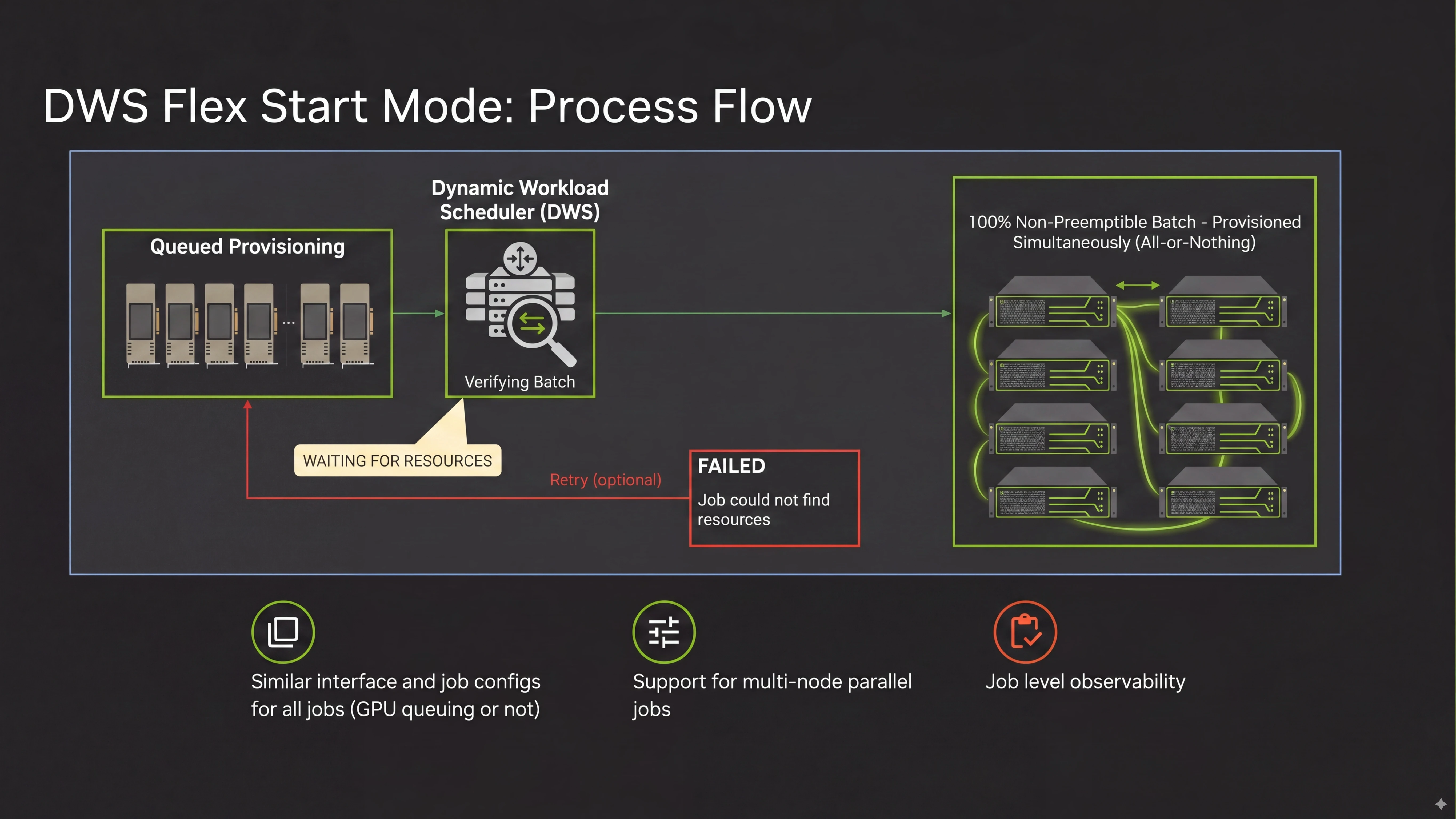
Instead of the traditional “give me 32 GPUs right now or error out” approach, Flex Start uses a queued provisioning model. You submit your job requirements, and DWS puts you in a queue.
- The “All-or-Nothing” Advantage: DWS waits until every single accelerator you requested is available, then provisions them all simultaneously. No more paying for 70% of a cluster while waiting hours for the remaining nodes to show up.
- 100% Non-Preemptible: Unlike Spot VMs, once DWS provisions your Flex Start nodes, they are guaranteed to run uninterrupted for the full length of your job (up to 7 days).
- Massive Savings: Flex Start comes at discounts up to 50%+ off standard pricing and draws from preemptible/flex quota limits, which are often far easier to request.
Example: Submitting a DWS Flex Start Job in GKE
apiVersion: batch/v1
kind: Job
metadata:
  name: dws-llm-finetuning
spec:
  template:
    spec:
      nodeSelector:
        cloud.google.com/gke-flex-start: "true"
        cloud.google.com/gke-accelerator: nvidia-h100-80gb
      restartPolicy: Never
      containers:
      - name: trainer
        image: gcr.io/my-project/llm-trainer:v1
        resources:
          limits:
            nvidia.com/gpu: "8"
B. Calendar Mode: Booking Hardware Like a Hotel Room
If your team is running a scheduled LLM pre-training run or a customer demo next Tuesday, you need exact predictability. Calendar Mode lets you search for available GPU/TPU capacity blocks and reserve them for fixed windows (1 to 90 days in advance).
- Predictable & Co-located: You get guaranteed start and stop times, plus the underlying hardware is physically co-located in the data center for ultra-fast interconnect speeds.
- Lead Times: You typically book GPUs ~4 days in advance and TPUs ~24 hours ahead of time.
Useful Google Cloud Docs
- 📖 Dynamic Workload Scheduler (DWS) Concepts in GKE
- 📖 Flex-start with Queued Provisioning Guide
- 📖 Introducing Dynamic Workload Scheduler (Google Cloud Blog)
3. Granular Node Auto-Provisioning & ComputeClasses: Pod-First Scheduling
Historically, GKE required platform engineers to manually create and maintain dozens of rigid node pools (e.g., pool-n2-standard-4, pool-c2-standard-8, pool-gpu). If a pod needed a machine type that wasn’t in an existing pool, it stayed Pending.
Granular Node Auto-Provisioning (NAP) and ComputeClasses allow you to define compute “intents” or “classes” (e.g., high-memory, gpu-cluster, cost-optimized). Node creation used to happen sequentially. GKE 1.34+ creates node pools in parallel, drastically cutting down scale-up wait times.
Why ComputeClasses Boost Obtainability
- Declarative Flexibility: Instead of hardcoding instance types, your ComputeClass can specify a flexible list of acceptable machine families (e.g., N2, N2D, C2, C3). If N2 is out of stock in a zone, GKE automatically provisions C3 instead.
- Automatic Node Tainting: ComputeClasses automatically apply taints (cloud.google.com/compute-class=<name>:NoSchedule) to all nodes associated with a certain compute class, so standard web pods don’t accidentally spill onto expensive GPU or high-mem nodes.
Useful Google Cloud Docs
4. Location Strategy & Topology: Don’t Put All Your Pods in One Zone
Datacenters occasionally experience local capacity constraints. If your entire GKE cluster lives in a single zone (us-central1-a) and that zone runs low on a specific machine type, your workloads will stall.
How to Build a Flexible Location Strategy
- Always Go Regional: Deploy regional GKE clusters spread across at least 3 availability zones (a, b, and c). This instantly triples the pool of hardware GKE can draw from. This can cause additional network cost and overhead, but gives you the best chance of obtaining the hardware.
- Use Topology Spread Constraints: Configure topologySpreadConstraints with maxSkew: 1 on key deployments. This instructs Kubernetes to balance pods evenly across zones. If zone a runs low on compute, GKE seamlessly schedules new pods in zone b or c.
- Understand the Compact Placement Trade-off:
- For distributed AI training or HPC, you often want Compact Placement (cloud.google.com/gke-placement-group), which places nodes as close together as physically possible for microsecond network latency.
- The Obtainability Catch: Finding 64 contiguous H100 GPUs in a single physical rack is much harder than finding 64 GPUs scattered across a datacenter. Use compact placement for training jobs, but keep non-compact fallback pools for standard batch and serving workloads.
Useful Google Cloud Docs
- 📖 About Regional Clusters in GKE
- 📖 Define Compact Placement for GKE Nodes
- 📖 Place Pod in a Specific Zone
5. Spot VMs: 90% Savings Without the Outage Headaches
Spot VMs let you run spare Google Cloud capacity at up to 60–90% off standard pricing. The catch? Google can reclaim (preempt) them with just a 30-second warning whenever an on-demand customer needs the capacity.
If mismanaged, Spot preemption storms can take down your application. But when configured properly, Spot VMs are an incredible tool for cost-effective capacity.
Rules for Spot VM Success
- Isolate Your System Workloads: Never run CoreDNS, CNI plugins, ingress controllers, or kube-system pods on Spot nodes. Keep a small, dedicated non-Spot node pool for system essentials.
- Diversify Machine Families: Don’t bind a Spot node pool to a single instance type. Allow node auto-provisioning or multi-pool configurations to pick from N2, N2D, C2, C3, and C3D families.
- Handle the 30-Second Shutdown Cleanly: Set terminationGracePeriodSeconds so your apps catch the preemption SIGTERM signal and flush state or save checkpoints.
- Active Migration (GKE 1.34+): GKE can now automatically burst onto On-Demand instances when Spot capacity is constrained, and then gracefully migrate your pods back to Spot VMs once Spot capacity re-opens!
Example: Pod Spec explicitly tolerating Spot VMs
apiVersion: apps/v1
kind: Deployment
metadata:
  name: worker-array
spec:
  template:
    spec:
      tolerations:
      - key: "cloud.google.com/gke-spot"
        operator: "Equal"
        value: "true"
        effect: "NoSchedule"
      nodeSelector:
        cloud.google.com/gke-spot: "true"
Useful Google Cloud Docs
6. Instant-On Scaling: Goodbye Node Startup Delays
Even when compute is readily available, booting a fresh GKE node takes roughly 80 to 120 seconds. If your traffic spikes suddenly, waiting 2 minutes for new nodes to spin up can mean dropped requests and unhappy users.
To scale instantly, you need capacity buffers (warm standby capacity).
Modern vs. Classic Buffering Strategies
- GKE Capacity Buffers / Active Buffers (GKE 1.34+):
- Instead of hacking together custom manifests, GKE now offers the native CapacityBuffer Custom Resource.
- You simply declare how much buffer capacity you want to hold in reserve (e.g., “always keep 5 nodes worth of extra CPU/Mem warm”). The GKE Autoscaler treats this as virtual pending demand and keeps warm nodes ready to go.
- The Classic “Pause Pod” Trick:
- If you’re on an older GKE version, deploy low-priority “balloon” or “pause” pods using a negative PriorityClass.
- These pause pods sit quietly on real nodes doing nothing. When a real, high-priority user request comes in, Kubernetes immediately kicks out the pause pod, taking over its node instantly. The evicted pause pod then triggers background autoscaling in the background.
Useful Google Cloud Docs
7. Compute Advisor (Capacity Advisor): Intelligent Capacity Steering & Auto-Verification [Preview]
Even with a well-planned architecture, manually auditing regional quotas, active reservations, and fallback priorities across dozens of node pools can lead to provisioning timeouts and accidental stockouts. Compute Advisor for GKE brings context-aware automation to resource obtainability by proactively scanning your GCP quotas, Committed Use Discounts (CUDs), and reservations to generate capacity-aware Custom Compute Class (CCC) manifests.
Why Compute Advisor Boosts Obtainability
- Automated Quota & Reservation Verification: Audits parallel regional CPU limits (
[compute.googleapis.com/cpus](https://compute.googleapis.com/cpus)) and automatically maps active GCE reservations to node pool fallback priorities to prevent blocked scale-ups. - Intelligent Spot & Machine Family Steering: Tracks real-time Spot obtainability trends to steer elastic workloads toward available families (e.g., automated Spot N2D fallbacks).
- Karpenter-to-GKE Migration: Seamlessly parses existing AWS Karpenter specifications and compiles them into valid, schema-checked GKE Custom Compute Class (CCC) manifests.
- GitOps-Ready Manifest Generation: Emits validated, copy-pasteable standard Kubernetes YAML blocks so platform engineers can commit changes safely through existing CI/CD pipelines.
Useful Google Cloud Docs
8. Infrastructure Prerequisites: The Silent Blockers
Sometimes GKE fails to obtain resources not because Google Cloud is out of servers, but because of a misconfiguration in your own GCP environment.
Don’t Get Tripped Up By These Gotchas
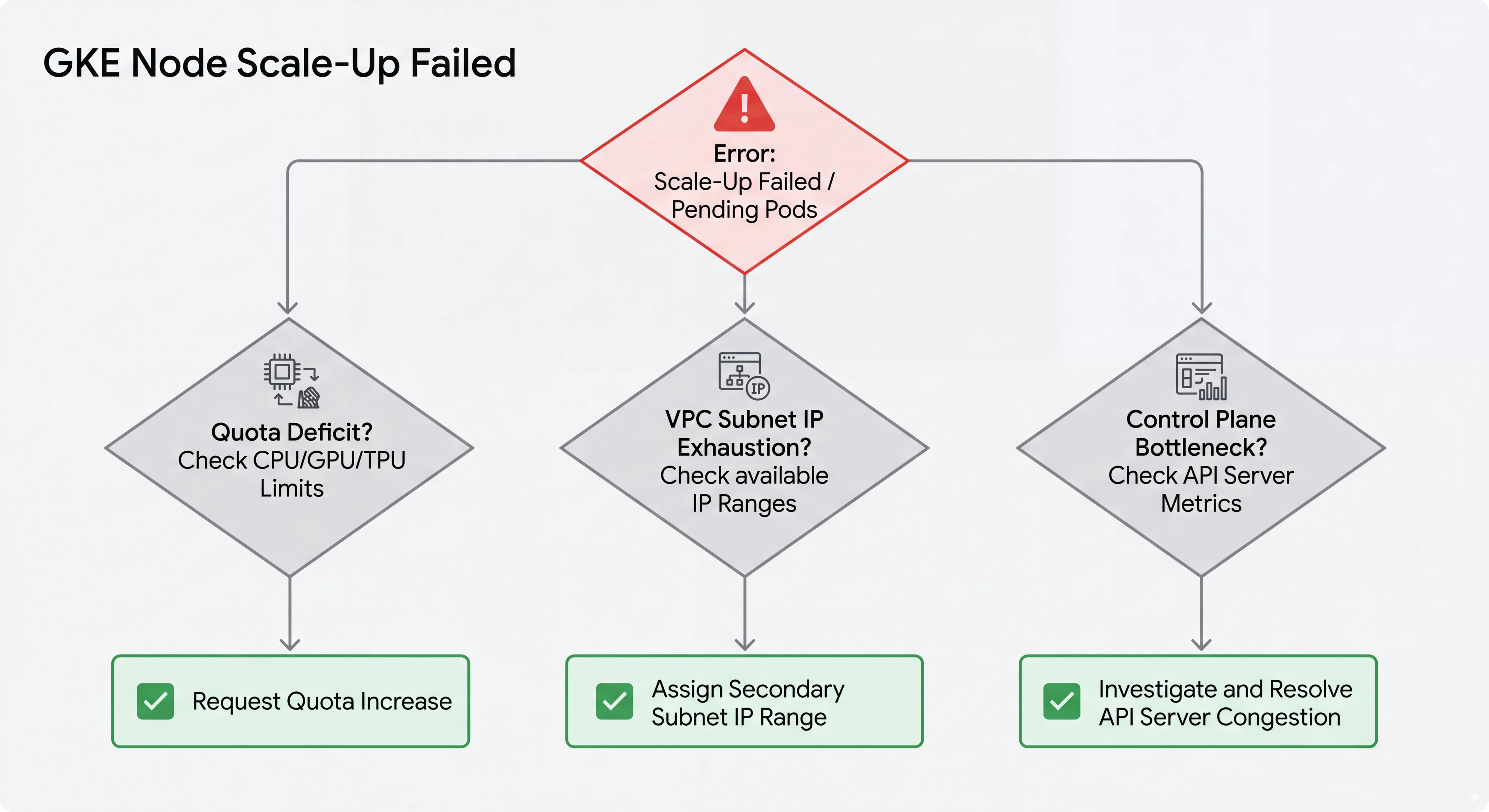
- Quota Deficits: Compute Engine limits how many CPUs, GPUs, and TPUs your project can consume in a region. Always double-check that your Standard CPUs, Spot CPUs, and Flex Start quotas are requested well in advance of scale-up events.
- VPC Subnet IP Exhaustion: In VPC-native GKE clusters, every node and pod consumes IP addresses from your subnet. If your primary or secondary IP ranges run out of addresses, GKE cannot create new nodes, even if hardware is available!
- Control Plane Bottlenecks: Ensure your cluster control plane isn’t overloaded during massive scale-ups. GKE Autopilot and managed Standard control planes handle auto-scaling automatically, but keep an eye on API server metrics during high-burst events.
Useful Google Cloud Docs
- 📖 Quotas and Limits in Google Cloud
- 📖 Creating VPC-native Clusters with IP Alias
- 📖 Assign additional subnets to a VPC-native cluster
9. Summary: Choosing the Right Strategy for Your Workload
| Workload Type | Best Reservation / Provisioning Strategy | How Nodes Are Provisioned | Topology Strategy | Helpful Documentation |
|---|---|---|---|---|
| Mission-Critical APIs | On-Demand Reservations (SPECIFIC_RESERVATION) | ComputeClasses / Autopilot | Regional, Multi-Zone Topology Spread + Active Buffers | Reservations |
| Scheduled LLM Pre-Training | DWS Calendar Mode | Future Reservations + Kueue | Compact Placement (Single Zone) | DWS Concepts |
| Batch ML Fine-Tuning | DWS Flex Start Mode (Queued Provisioning) | Queued Provisioning + Node Recycling | Multi-Zone All-or-Nothing | Flex Start Guide |
| Fault-Tolerant Batch Jobs | Spot VMs (reservationAffinity: NONE) | Spot VMs / Spot Pods | Multi-Zone + Flexible Machine Series | Spot VMs Guide |
| Latency-Sensitive Microservices | Baseline On-Demand + Capacity Buffers | Active Buffers / Pause Pods | Multi-Zone Regional Distribution | Configure Capacity Buffers |